A trading platform puts charts and order controls on your screen. A broker provides services under an agreement. A convenient chart says nothing about the company receiving your money. Check the software and the account provider separately: can you carry out the operations you need, and do you know which company is responsible for the account?
Trading platform, broker and exchange: different jobs
A trading terminal is software for viewing prices, sending orders and monitoring open trades. It may show charts, pending orders, open trades and execution history. Features depend on the program, connection and account. A charting service does not necessarily support live trading.
A broker accepts customer instructions and provides the services described in its agreement. For exchange-traded products, it can provide access to an organised venue. The exchange sets that venue’s trading rules. The article on how an exchange works explains those roles; the essential distinction here is between the program you operate and the company you contract with.
Not every product displayed in a terminal trades on an exchange. With an over-the-counter contract, the provider may itself be the other party. That arrangement does not establish fraud. Check the permitted service, the actual contract and the execution policy. Processing orders internally and inventing trades are different things.
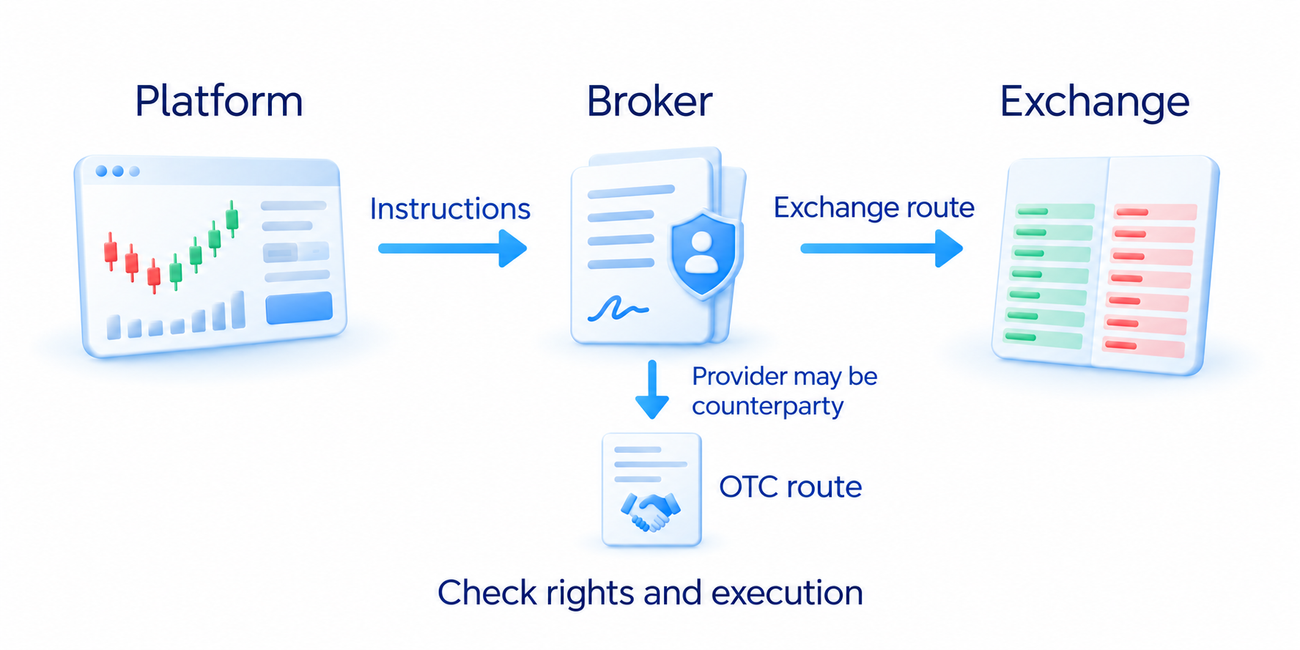
Before opening an account, identify the contracting company, the product and how orders are handled. Owning a share and holding a contract based on its price can produce similar-looking charts while giving you different rights. If the provider cannot explain what you would own or owe, do not proceed to a deposit.
What to check in TradingView
TradingView provides charts, drawing tools and market indicators. Its Paper Trading mode uses virtual funds. Trading through a connected broker is a separate arrangement, available only for supported integrations, products, regions and account permissions. Creating a TradingView login does not create a funded brokerage account.
Check the full instrument name, venue or data provider, and product type. The same short symbol can appear in several feeds. A forex chart from one provider is not a record of all transactions in the worldwide currency market. Choose the actual feed before comparing price or volume.
Find out whether the data are delayed. A platform subscription does not automatically include every exchange’s real-time quotes. The chart feed and a connected broker’s order panel can also use different data permissions. Check their labels rather than assuming the displayed chart price is the price available for your order.
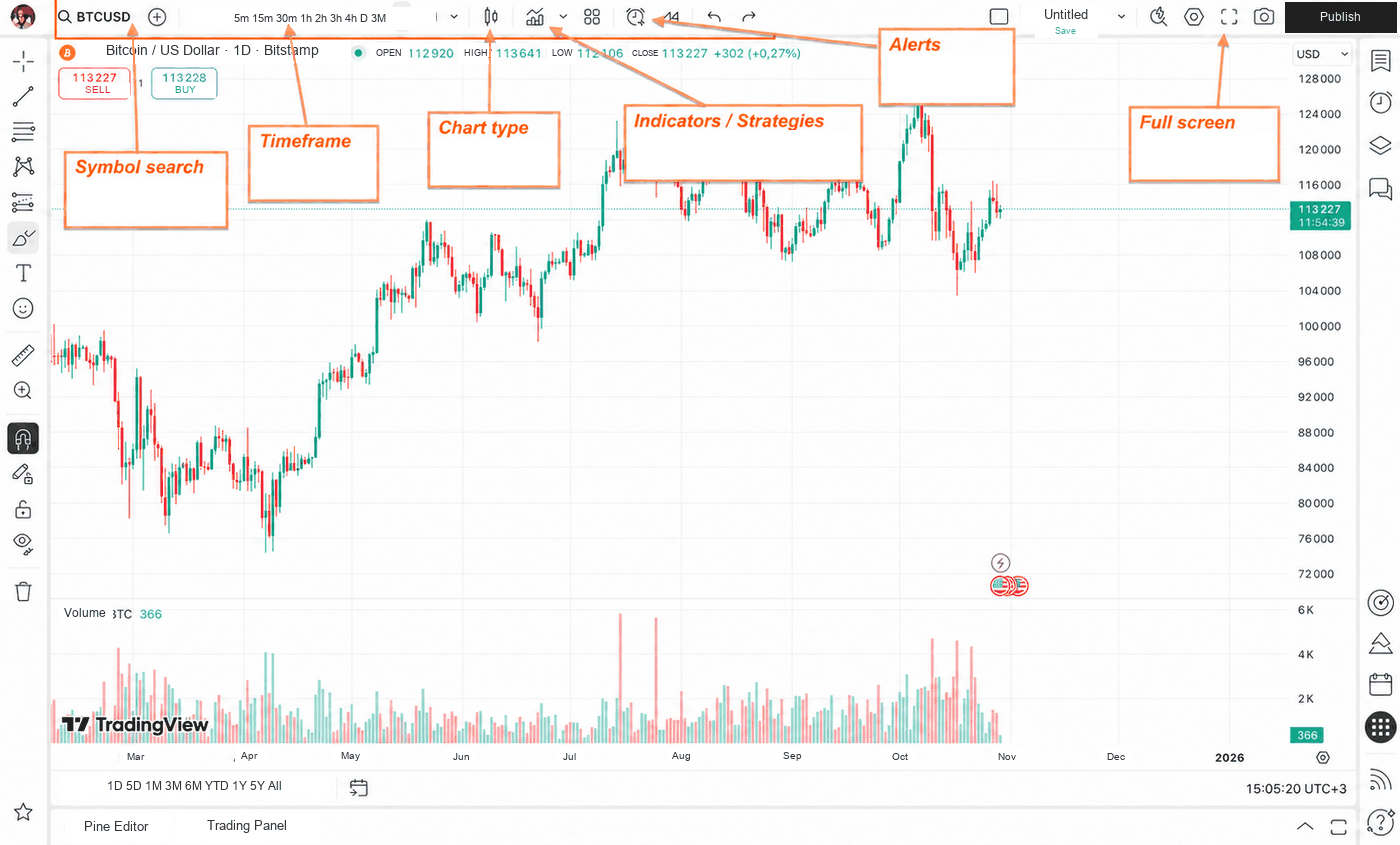
For the course exercises, keep the price chart, the levels you are studying and the relevant volume display. A timeframe is the period represented by one bar or candle. Use a consistent period so you can compare observations. The chart-reading article explains how opening, high, low and closing prices form each bar; changing its visual style does not create new price information.
Identify what the volume display measures. Exchange volume can count traded shares or contracts; tick volume counts quote updates. They cannot be treated as interchangeable. Adding another indicator cannot restore trades absent from the feed. The volume-analysis article explains how to interpret the available measurement.
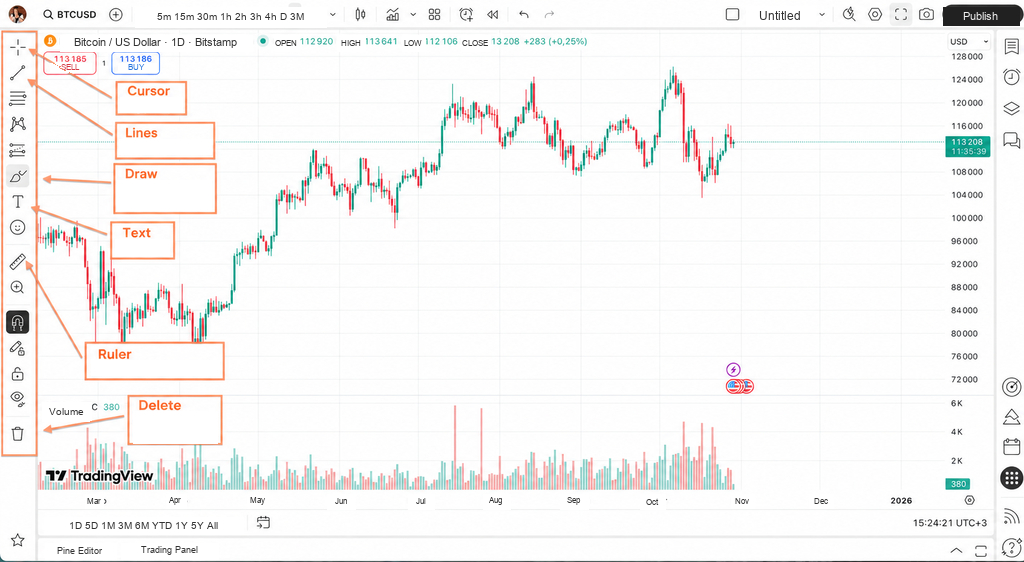
A price alert sends a notification when its configured condition occurs. Check the symbol, condition, expiry and delivery method. An ordinary alert does not place or close a trade. Any separate automated order mechanism must be deliberately configured; reaching a level alone does not supply a trading decision.
How to practise on a demo account
A demo account uses virtual money. In TradingView, connect Paper Trading through the trading panel; interface labels can change. Confirm the selected account before placing an order. A broker’s live and demo accounts can use different login details, and switching a screen is not proof that the account remains simulated.
Practise the complete operation with one available instrument. In the order ticket, check buy or sell, quantity, order type and any required price. Submit it, then inspect its status. A pending order is not an open position. Change or cancel an unfilled order, and separately close a position if a fill has created one. The order-types article explains what each instruction controls.
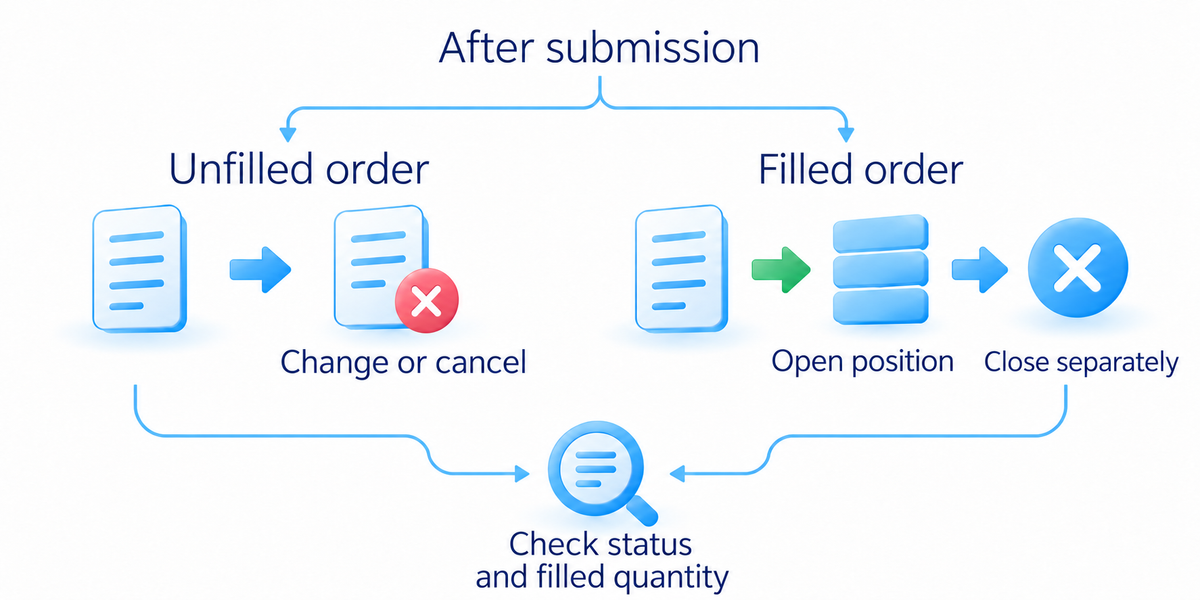
Compare the requested parameters with the execution history. Check quantity units, fill price, account currency and available protective orders. If the ticket accepts one lot, establish how many instrument units that lot contains. A technically valid quantity is not necessarily an affordable real position.
A simulator helps you learn the controls. It does not establish live fill speed, slippage (a fill at a different price from the one expected), withdrawal access or the emotions of losing your own money. Simulated futures can also use settlement rules different from the real contract. Set virtual capital, costs and leverage, the ability to control a position larger than the funds put up, to match the exercise instead of allowing an oversized virtual balance to conceal quantity mistakes.
Testing a trading method requires written rules and a recorded series of trades, which the trading-system article covers. The goal of terminal practice is narrower: recognise the account mode, distinguish an order from a position, and verify, modify and finish an operation without guessing.
How to check a broker before depositing
Find the legal company name in the agreement, its jurisdiction and its supervising authority. Open the authority’s official register independently. Check the current status and the services permitted for the product you want. A company-registration entry is not the same as permission to provide every financial service.
Match the website, contact details and contracting entity with the official record. A clone can copy a genuine company’s name and registration number while giving a different website or phone number. Another company in the same group may have different permissions and protections. Verify the entity signing your agreement.
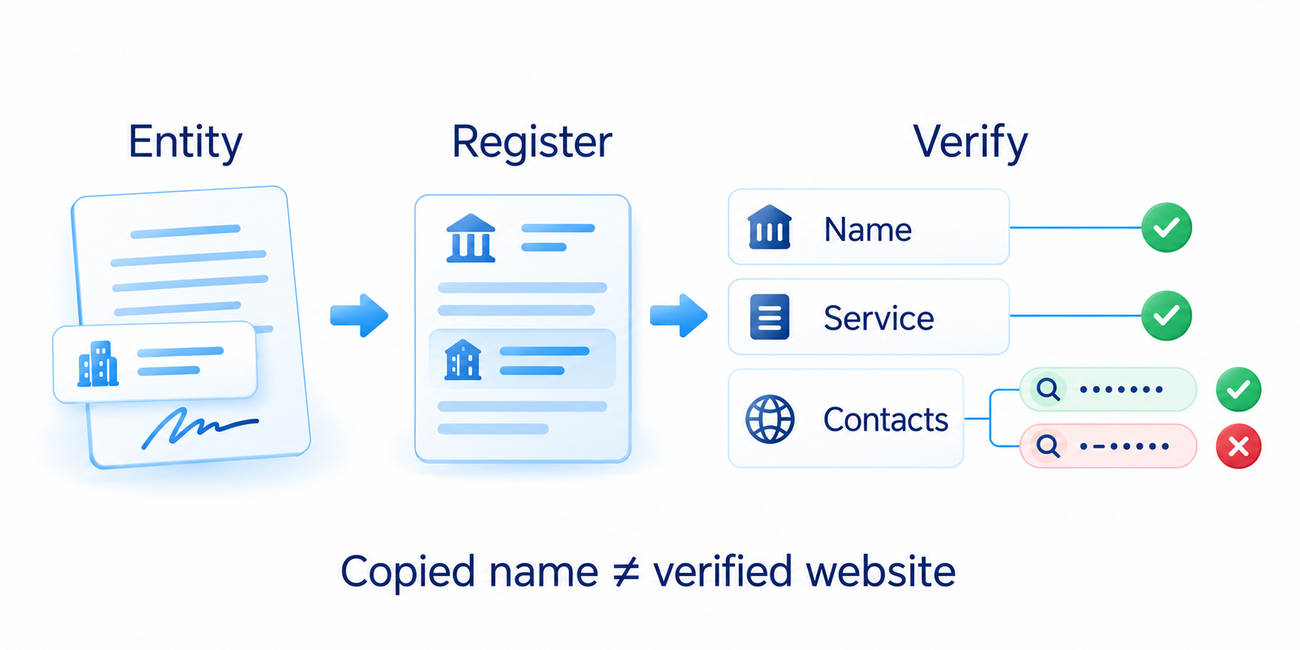
Ask how customer money and assets are held, where complaints go and what protection applies to that account. Regulation does not guarantee profit or repayment of every loss. Compensation schemes have eligibility conditions; a fall in an investment’s market price is not automatically a covered custody loss.
In my course’s broker-selection section, the sequence begins with regulation and available instruments, then moves to execution conditions, costs and the platform. I check who provides the service and whether it fits the intended work before comparing tariffs. Demo practice helps me learn the program; it does not prove that money held by the company is safe.
The video on choosing a broker adds the same practical sequence: regulation and licence first, instruments next, then commissions and spreads. The written checks here stand on their own. A salesperson’s assurance or one simulated trade cannot replace verification of the company.
Before funding, establish the account’s product range, execution terms, charges and withdrawal process. Read the permitted withdrawal methods, processing times, restrictions and costs. A register entry does not fill a gap in those terms. Compare providers for the same product and planned operation, rather than comparing unrelated promotional rates.
Compare the costs and account terms
Ask for the full cost schedule: buying and selling commissions, the bid-ask spread, data or account fees, overnight funding and currency conversion where applicable. The spread is the difference between the best quoted buying and selling prices. Zero commission for one action does not make the whole account free. On a crypto venue, fees may depend on whether your executed quantity adds waiting liquidity or trades against available orders. Check the percentage’s calculation base and both entry and exit.
For a hypothetical tariff, buying costs $1, selling costs $1 and account service for the period costs $3. Those three charges total $5: 1 + 1 + 3. That is not the complete trading result. The price change, spread and any other applicable charges must still be included. Compare the whole operation, not merely a free entry.
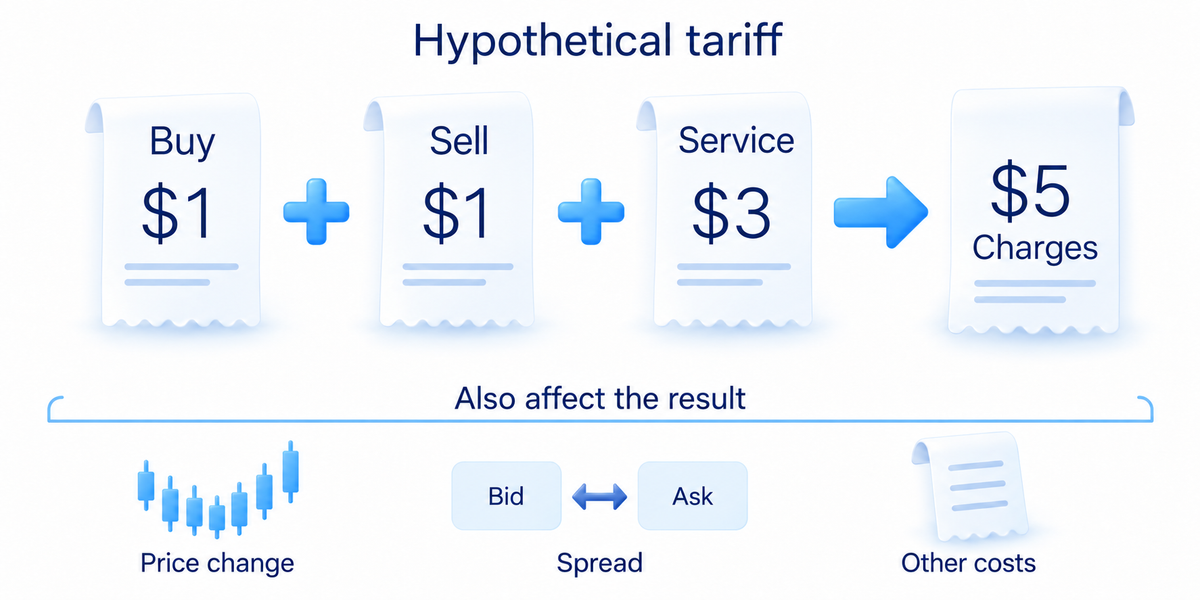
Check minimum quantity, supported order types and the execution policy. Fast software cannot guarantee a fill at every displayed price. Find out where to confirm an order’s status after a disconnection and how to reach support. Risk management explains the loss budget and position size; the terminal must let you implement the required instructions.
Read deposit and withdrawal procedures, fees, processing times and identity-verification requirements. A successful small withdrawal is not a lasting guarantee of reliability. If someone requests an extra payment to an unrelated account to unlock profits, stop and verify the request through independently confirmed official contacts.
When to stop the account-opening process
Guaranteed returns, pressure to deposit immediately and refusal to provide an agreement are reasons to stop. Do not give a supposed mentor remote access to your device or disclose authentication codes. When the website differs from the register, use the contacts in the official record to investigate.
Traders sometimes use the label “bucket shop” for a suspect provider. The label does not establish what happened. An over-the-counter business model and fraudulent imitation are different issues. Base the decision on permissions, the contract, order handling and access to funds, rather than a promise that every order is sent to an exchange.
If the service offers access to a firm’s trading capital, read the prop-trading article before assuming it is an ordinary brokerage account. Trading for beginners sets out the broader learning route. After checking a platform and provider, you should know which operations are available, what they cost and which company answers a complaint.
Frequently asked questions
A broker provides account services under an agreement; a platform supplies the software for viewing data and working with orders. Connecting a broker does not mean the platform itself holds your real capital.
Yes. Paper Trading uses virtual money. Verify the selected mode and settings before sending an order. A simulated result does not guarantee the same fills or financial outcome on a live account.
Choose the exact instrument, data source and bar period, then keep price, relevant levels and the volume display. Establish whether volume means traded instrument units or quote updates. Removing clutter does not change that underlying data.
No. Verifying current permissions and the exact legal entity is necessary, but does not remove every risk. Protection depends on the jurisdiction, service and account conditions. It does not automatically compensate market losses.
No. An ordinary alert reports that a configured condition has occurred. Your system still needs a decision rule. Order changes or closure require a separate action unless an appropriate automated mechanism has been configured.
About the author
Igor Arapov, a practising trader since 2013 and author of the ArapovTrade library. ORCID: 0009-0003-0430-778X.