A trading order is an instruction to buy or sell an asset under specified conditions. You choose the instrument, the direction and the quantity. The order type controls how that instruction reaches the market and which prices it can accept.
Choosing an order means answering two different questions: what should start the trade, and what price are you willing to accept? A third question remains even after you press Submit: how much of the order actually filled?
How an order becomes a trade
The three basic choices are market, limit and stop orders. A market order seeks execution at available prices; a limit order controls the acceptable price; a stop order waits for a trigger before its specified execution instruction becomes active. These choices trade off execution speed, price control and activation conditions, and none guarantees a complete fill under every condition.
An order book lists available buy and sell orders by price. The best available buying price is the bid; the best available selling price is the ask. A market buy trades with sellers, starting at the ask. A market sell trades with buyers, starting at the bid.
The gap between the bid and ask is the spread. Both quotes can change as participants place, execute or cancel orders. The last-traded price describes a completed trade, not the price promised for your next one. The broader explanation of trading venues and participants is in how an exchange works.
An order and a position are different things. An order may be waiting, partially filled, cancelled or rejected; a position is the quantity you already hold after execution. Check the order status after submitting it. If the platform reports a rejection, read the reason rather than assuming that a trade took place.
Market orders: trade at available prices
A market order seeks execution at the best available opposing prices. It suits a task where execution matters more than setting a maximum buying price or minimum selling price. An ordinary market order has no limit price chosen by the trader.
Consider a simplified order book with 30 shares offered at $100 and another 20 at $101. You submit a market order to buy 50 shares. If those offers remain available and there are no better offers, the purchase costs 30 × $100 + 20 × $101 = $5,020. The average fill price is $5,020 ÷ 50 = $100.40 per share, before fees.
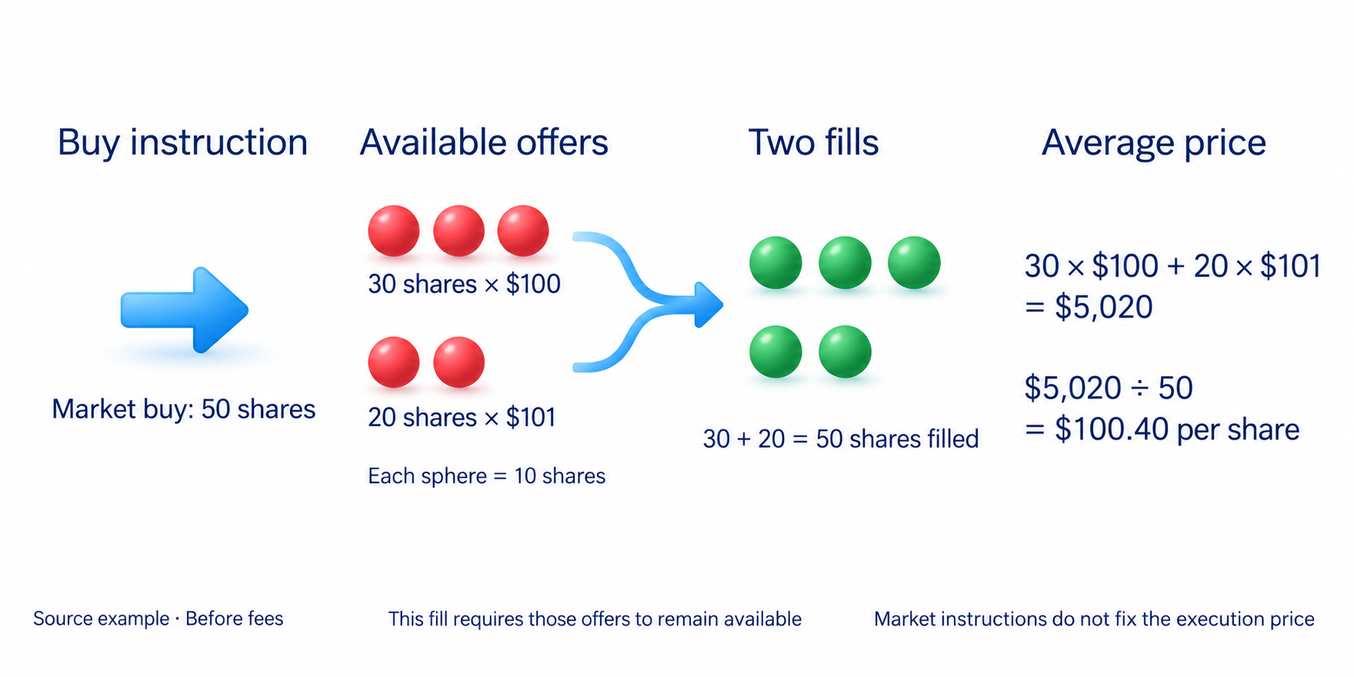
The displayed ask was $100, but there were not enough shares at that price. The difference between the expected price and the actual fill is called slippage. Quotes can also change while your order is being sent. Slippage is separate from the spread and can improve your price as well as worsen it.
A market order is not a promise that any quantity will fill under any conditions. Trading may be halted, opposing orders may be unavailable, or the venue may apply a protective price range. Depending on its rules, an unfilled balance may be cancelled or left as a limit order. Check what your platform means by Market for the instrument you trade.
Limit orders: control the acceptable price
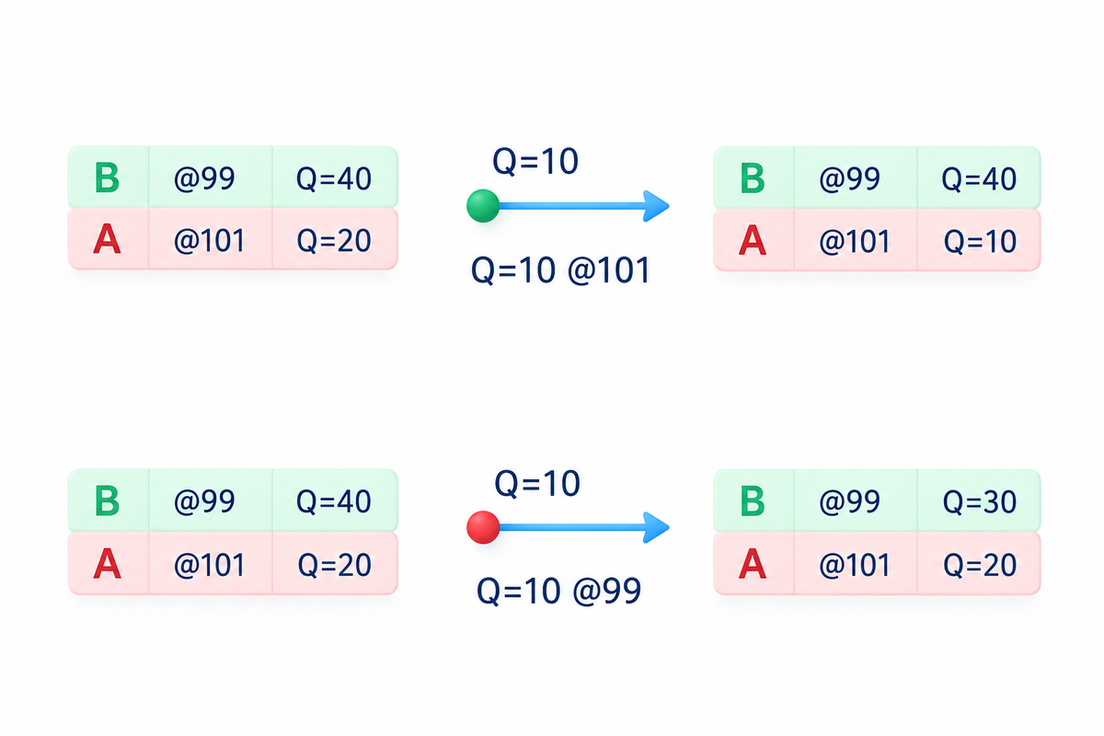
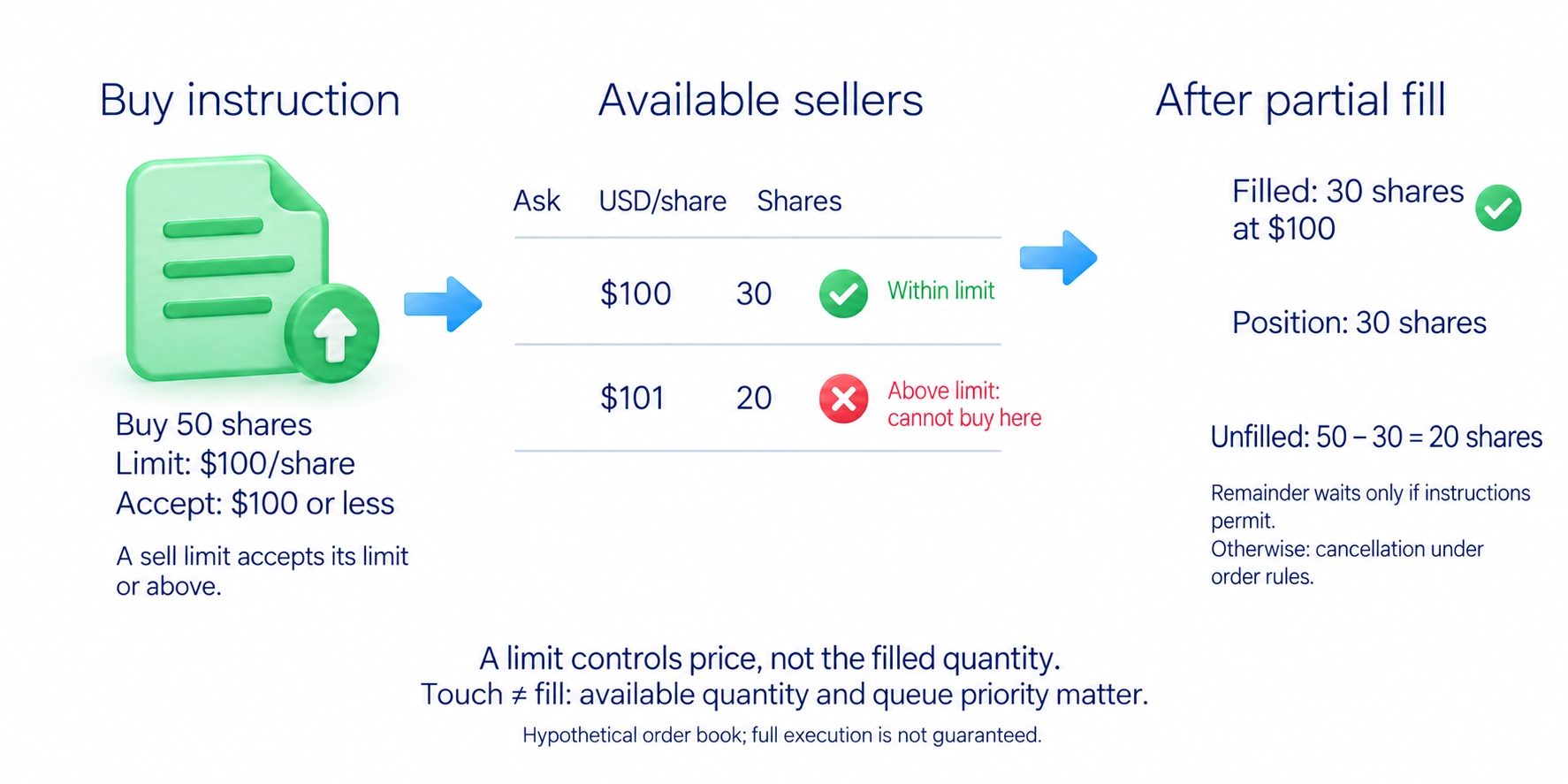
A limit order sets the most you will pay when buying or the least you will accept when selling. A buy limit of $100 allows a fill at $100 or less, but not at $101. A sell limit works in the opposite direction: it allows a sale at the limit or above it.
In the same order-book example, a limit order to buy 50 shares at $100 could initially buy only the 30 shares available at that price. The other 20 could remain waiting if the order instructions permit it. At that point you hold 30 shares, not 50.
A price touching your limit does not guarantee a fill. There may be too little opposing quantity, or other orders may take priority over yours. Many markets use price and submission time to allocate fills, but the matching rules are not identical on every exchange.
A limit order does not always wait. A buy limit high enough to accept the current ask can execute immediately, provided the available prices stay within the limit. A waiting order makes quantity available to other traders; an order that executes against it uses that quantity. The interaction and queue rules are explained in market microstructure.
Stop orders: activate after a price condition
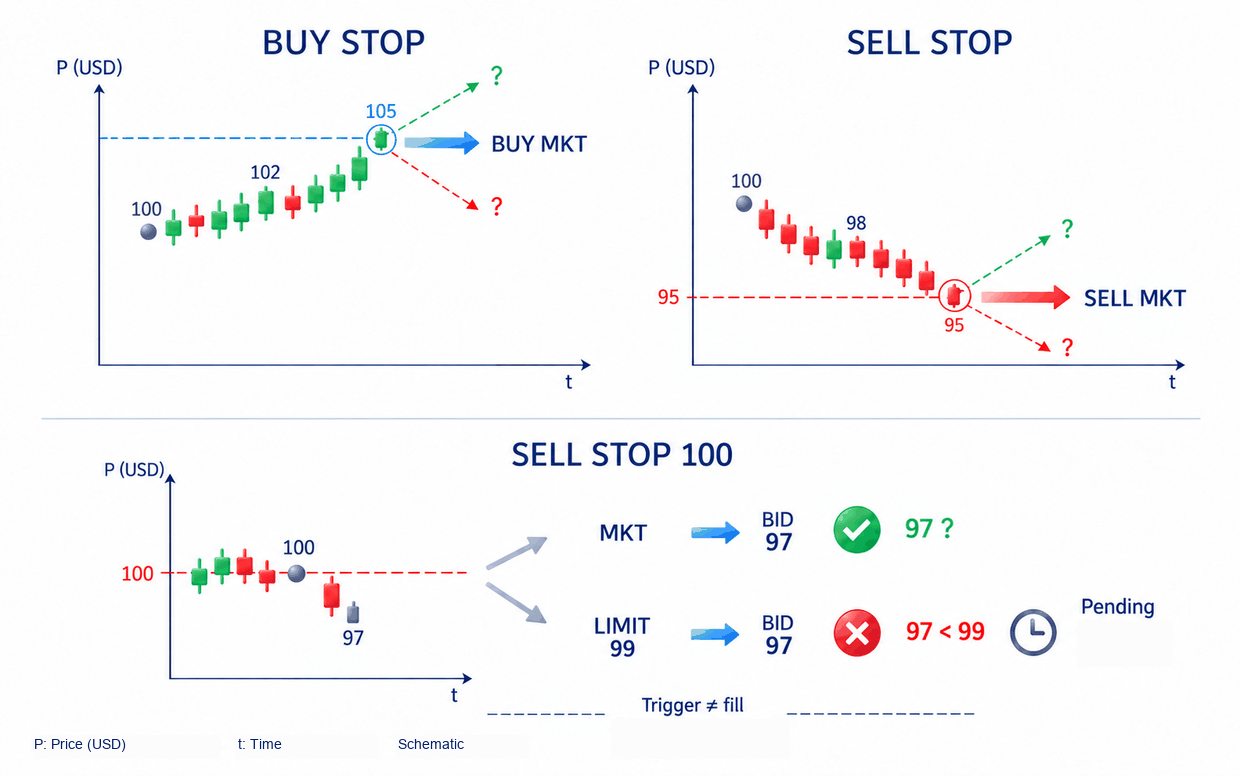
A stop order waits for an activation condition. With a standard stop-market order, meeting that condition releases a market order. The stop price determines when the instruction starts; it does not fix the eventual fill price.
A buy stop is normally placed above the current price to buy after a rise. A sell stop is normally placed below it to sell after a fall. Either can open or close a position. A sell stop can close an existing purchase; a buy stop can close a short position, a trade opened by selling with the intention of buying back later.
Check which price activates the stop. The trigger may use the last trade, the bid, the ask or a calculated price specified by the venue. Also check where the instruction is held: on the exchange, at the broker or in your trading terminal. A terminal-based function may need the terminal to remain connected.
Traders may place similar protective orders near visible highs and lows. If many stop-market orders activate together, the resulting buying or selling can accelerate a move when opposing quantity is limited. That mechanism does not establish who caused the move or whether anyone targeted your order. Trading interpretations of these areas are discussed in liquidity pools.
Stop-market vs stop-limit orders
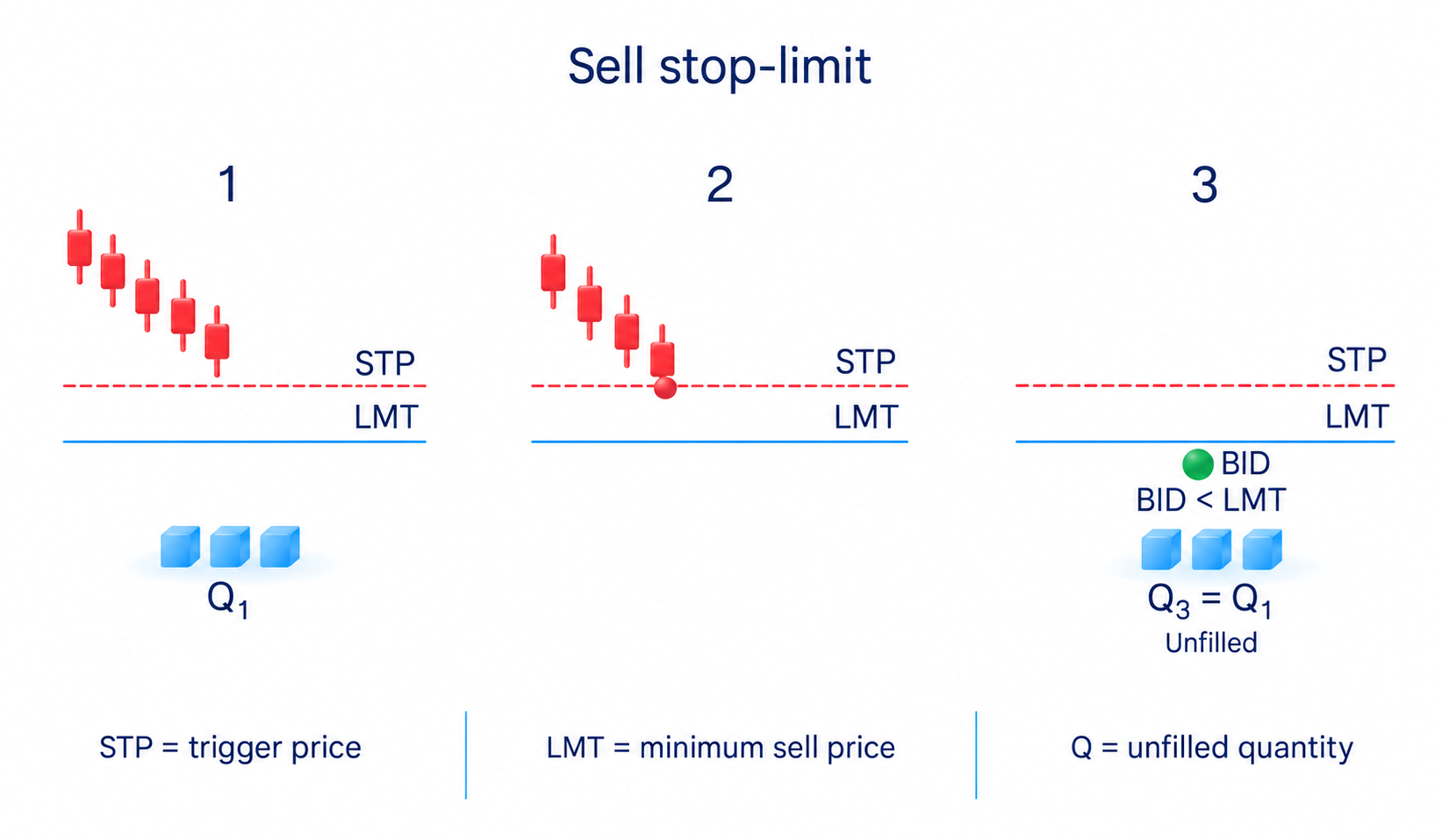
A stop-limit order uses two prices. The stop price activates the instruction; the limit price controls the acceptable execution price. After activation, it behaves as a limit order.
A separate gap example shows why that distinction matters. You want to sell an existing holding using a stop price of $100 and a sell limit of $99. Once activated, the order permits a sale at $99 or above. If the next available bid is already $97, the order cannot sell there and may remain unfilled.
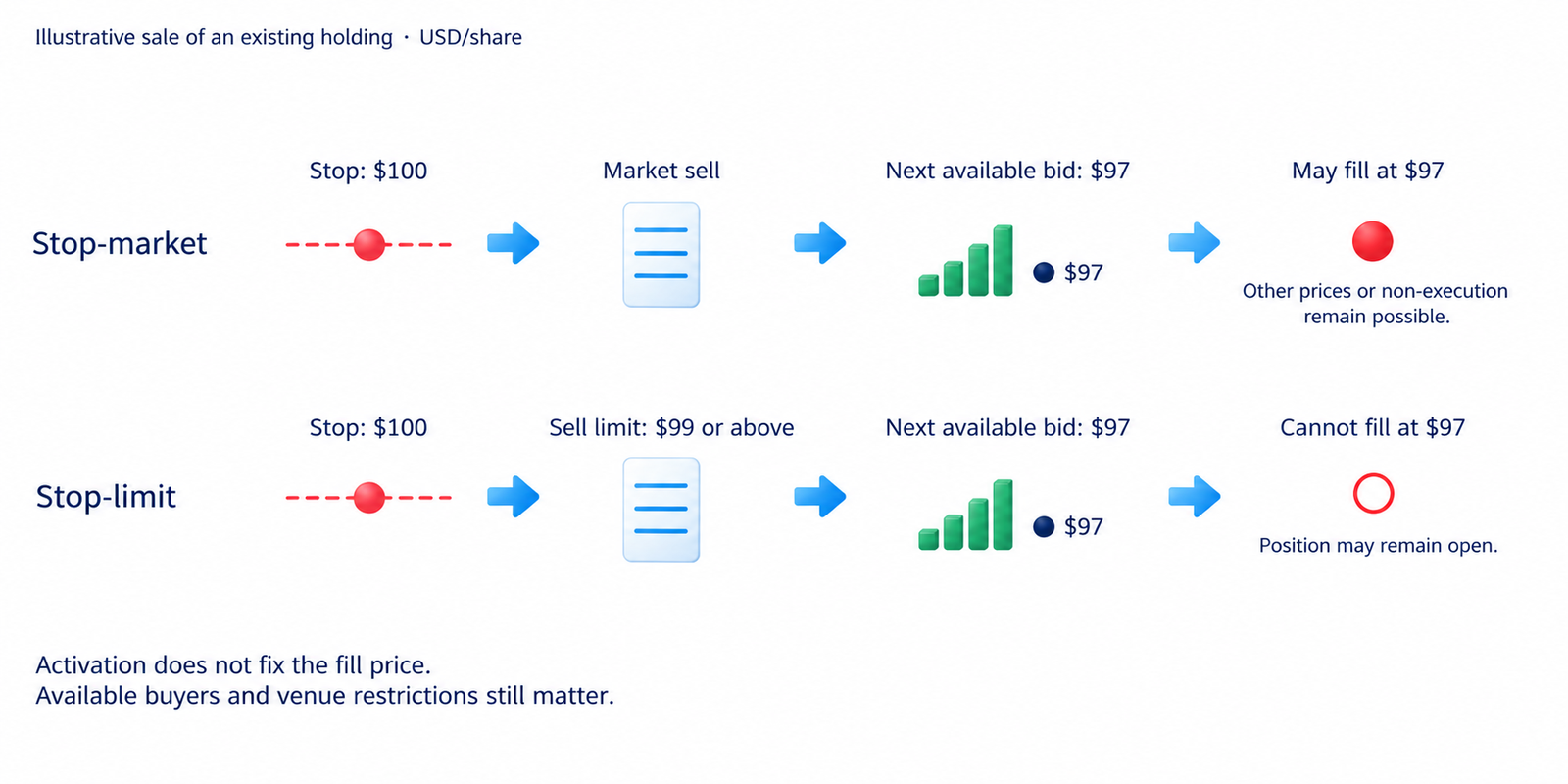
A stop-market order instead releases a market sell. It may fill at $97 or across several available prices. It still cannot guarantee an immediate exit during a trading halt, without available buyers or under venue restrictions. The trade-off is between a price restriction and the risk of remaining in the position because of that restriction.
If leaving the position matters more than refusing a particular price, a stop-limit may not meet your protective objective. If a worse price is unacceptable, the limit preserves that requirement, but you must accept possible non-execution. A button labelled Stop-loss does not tell you which order type sits behind it.
Stop-loss, take-profit and trailing stops
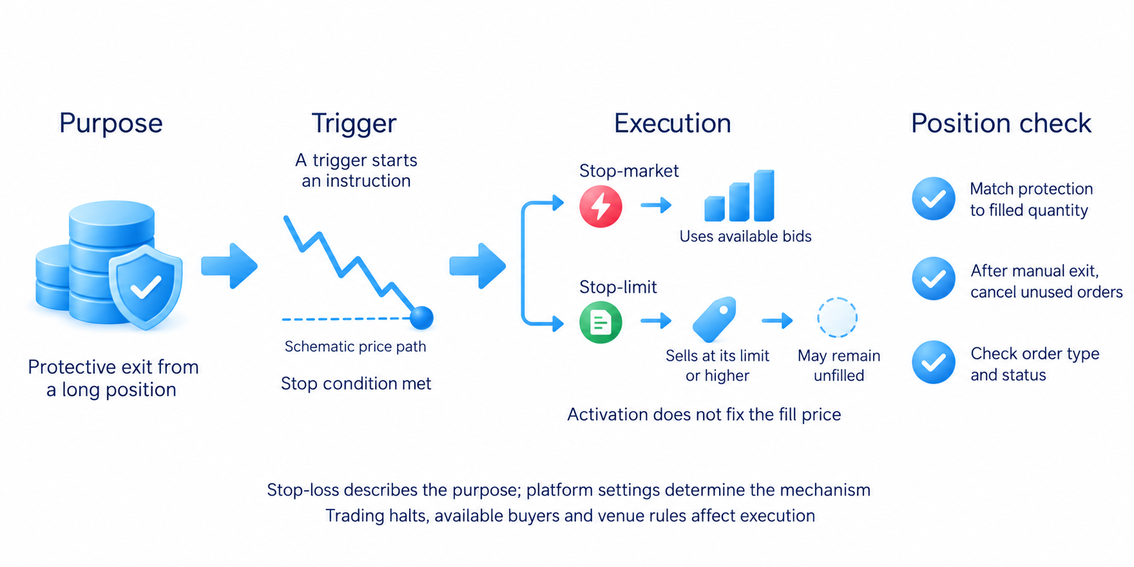
A stop-loss describes the purpose of an instruction: exit if the price moves against the trade. A take-profit instruction aims to exit at a profit target. The mechanism depends on the platform; a protective exit may use stop-market or stop-limit instructions, while a profit target often uses a limit order.
The protective quantity must match the position you actually hold. After a partial entry, check the size of the exit order. After a manual exit, cancel unnecessary orders or confirm that the linked system cancelled them. An order left behind can otherwise open an unwanted position. Choosing a protective level and sizing the trade around it are covered in risk management.
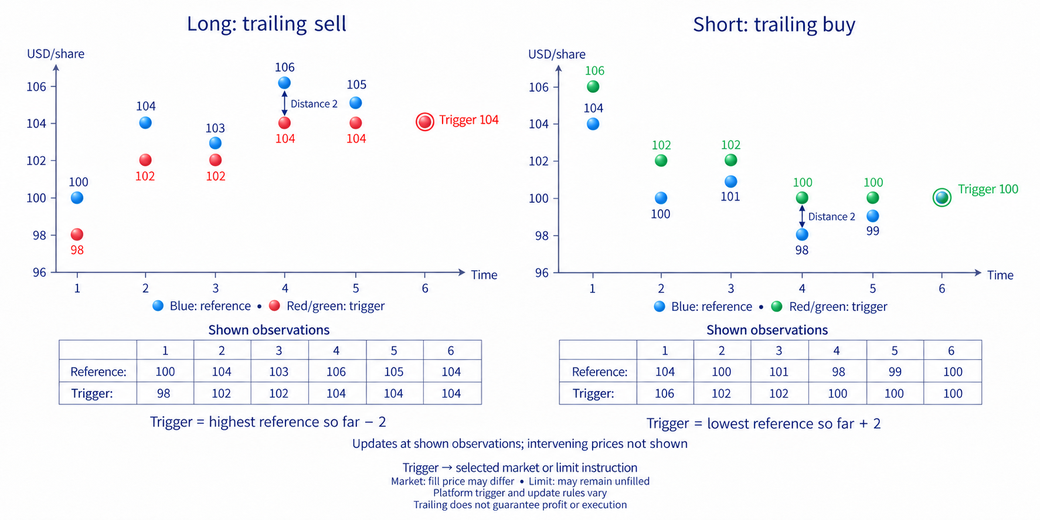
A trailing stop adjusts its trigger as the price moves in the trade's favour, using a specified distance in price units or percent. For a purchase, it moves up as the reference price rises and does not move down when that price falls. For a short position, the direction is reversed. The reference price and update rules depend on the platform.
A very small trailing distance can close a trade during an ordinary price fluctuation. Trailing does not guarantee a profit, and execution retains the limitations of the underlying order type. Automatic distance-based trailing is different from manually moving a stop behind a new high or low; that decision belongs to trade management.
Time in force and linked orders
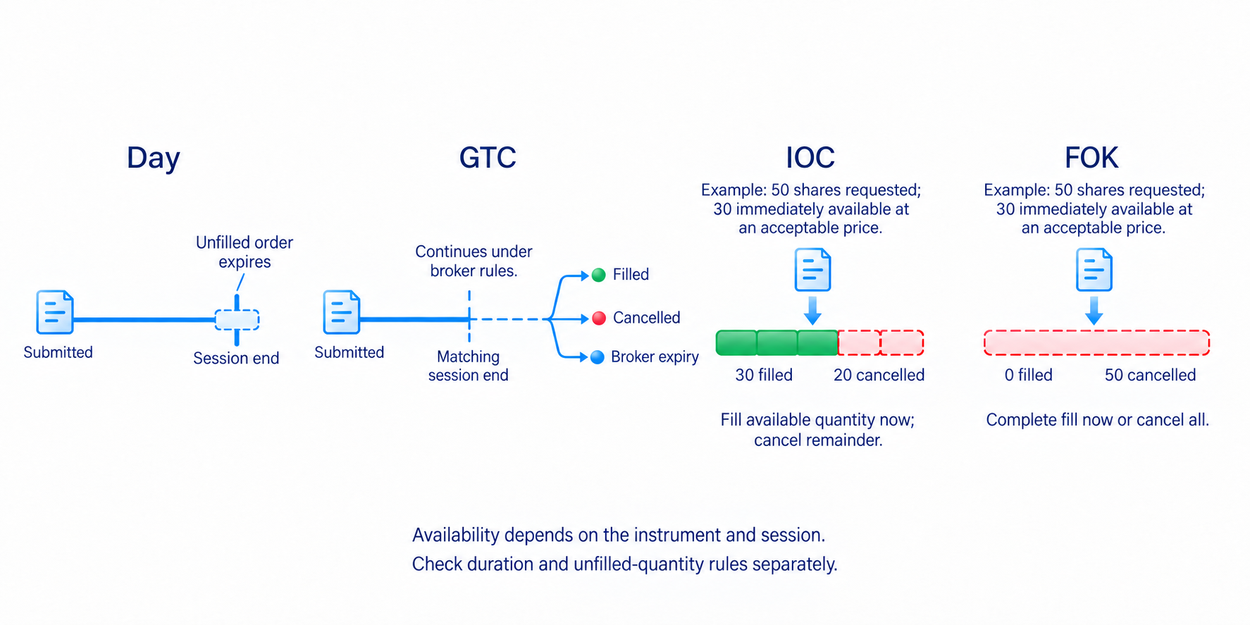
Time in force tells the platform how long an order should remain active. Other instructions determine whether it may fill partially and what happens to any unfilled balance.
- Day: an unfilled order expires at the end of the specified trading session.
- GTC, good till cancelled: remains active until filled, cancelled or expired under the broker's rules. It does not necessarily last forever.
- IOC, immediate or cancel: fills the immediately available quantity and cancels the remainder.
- FOK, fill or kill: requires an immediate complete fill; otherwise the entire order is cancelled.
Availability depends on the instrument and trading session. Check the applicable rules before reusing settings from another market, including whether an order participates outside the regular session.
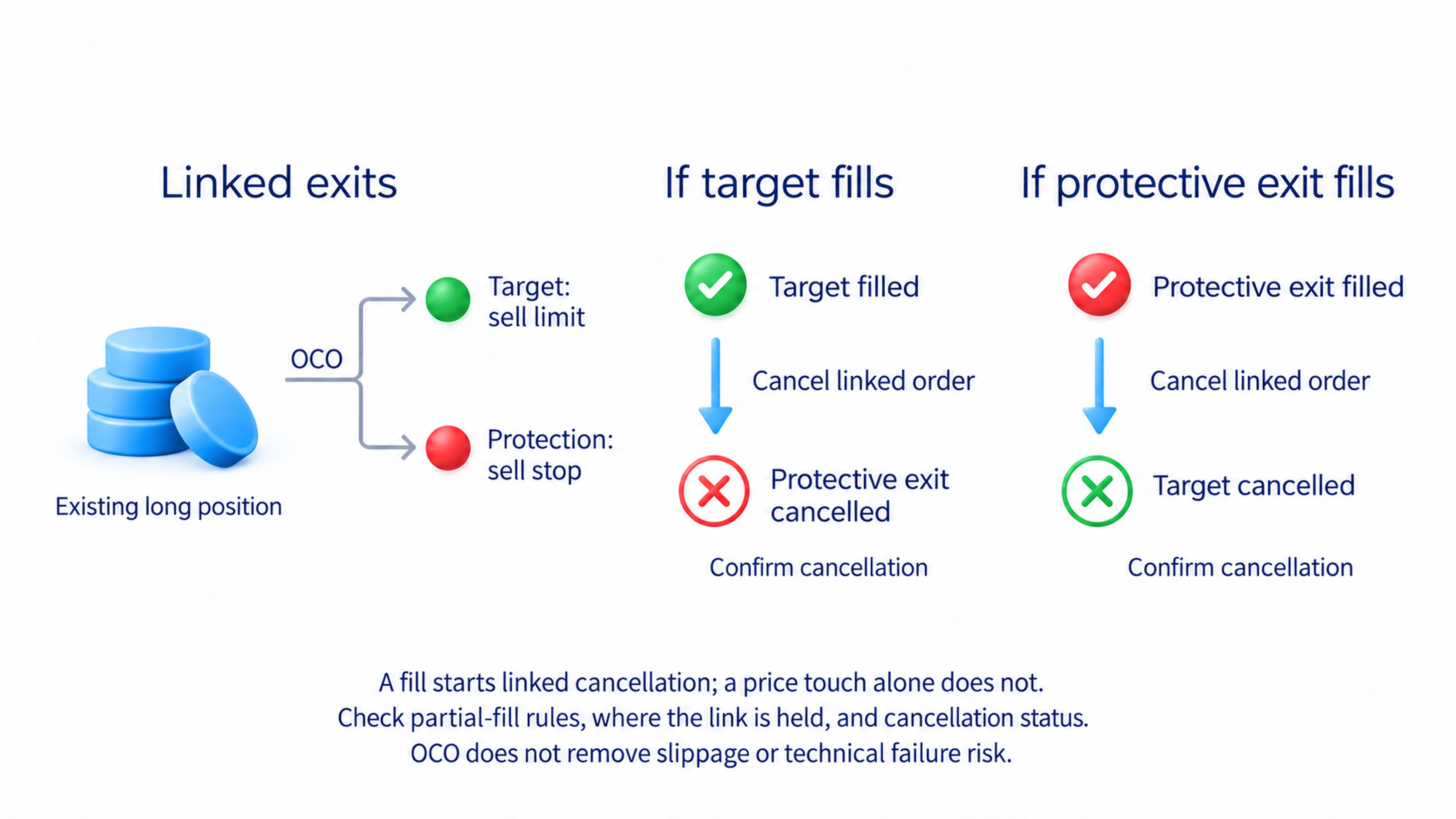
OCO, one cancels the other, links two orders so that filling one causes the other to be cancelled. A profit target and a protective exit are a common pair. Check how the platform handles partial fills, where the link is held and how cancellation is coordinated. The setting does not remove slippage or every risk of a technical failure.
Iceberg orders and algorithmic execution
An iceberg order displays only part of its total quantity. As the visible portion fills, quantity is replenished from the hidden remainder according to the venue's rules. This allows a participant to trade without showing the whole order at once.
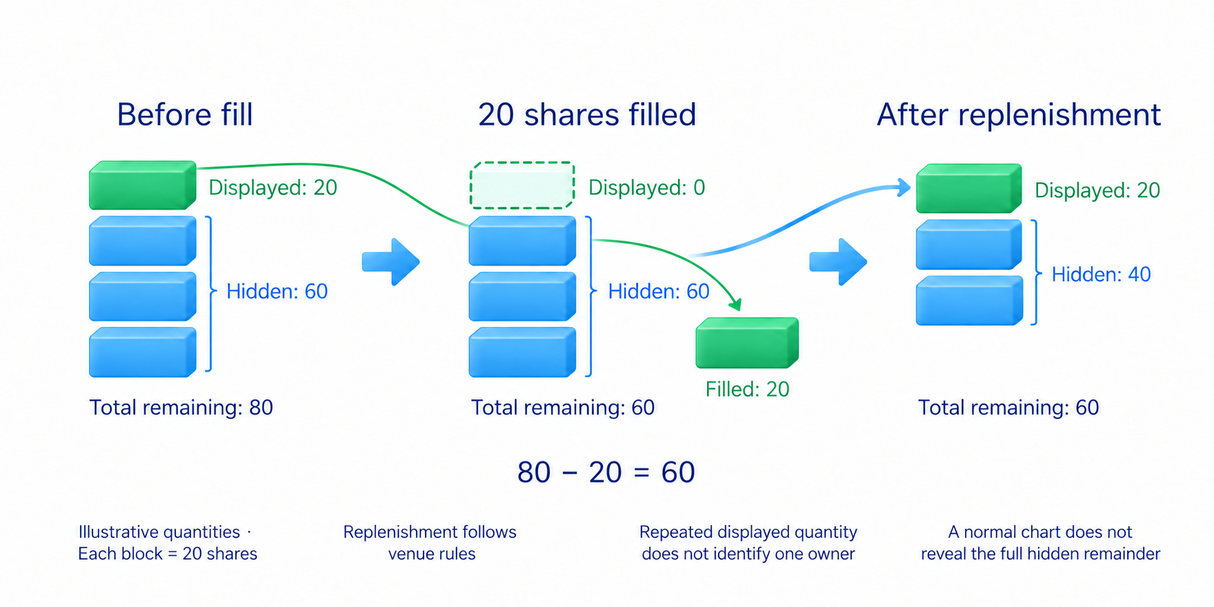
Repeated quantity at one price can suggest replenishment, but a normal price chart does not reveal the hidden balance or the owner's identity. Several independent participants can also submit orders at the same price. Large displayed quantity does not promise a reversal.
An execution algorithm manages orders automatically. It may divide a large trade into smaller pieces over time or adjust submissions to trading activity. The purpose can be to execute a genuine transaction with less market impact; not every algorithm exists to hide intentions or guarantees a better price.
Spoofing involves placing misleading orders with no genuine intention to execute them, to influence other participants. Cancelling an order alone does not prove spoofing: genuine instructions may change when circumstances change. Distinguish displayed orders from completed trades, whose data are explained in volume analysis.
How to check an order before and after submission
In my course section on order types, buy and sell instructions are connected to the price condition chosen for a trade. A limit can wait for an acceptable price, while a stop can activate after a specified level. Learning those commands lets you express a plan; the order type does not prove that the plan will make money.
The video Limit and market orders adds a practical explanation of how buying and selling instructions interact. The written explanation above stands on its own.
On a demo account, submit a market order and a limit order, then compare their status, fill prices and filled quantity. Set a stop and check both its activation condition and the order released after activation. This teaches platform commands, although simulated fills do not reproduce every real-market condition.
Before a real submission, check the instrument, buy or sell direction, quantity, time in force and exit instructions. Afterwards, confirm that the order was accepted. Following a fill, compare the position size with its protection; after closing the position, check for orders that remain active.
Frequently asked questions
A market order seeks a fill at available prices without a trader-defined limit. A limit order permits a purchase at its limit or below, or a sale at its limit or above. A limit may fill partly or not at all; immediate market execution also depends on available opposing orders and trading conditions.
A buy stop normally activates after the price rises to its trigger; a sell stop activates after a fall. A stop-market then releases a market order. The trigger does not fix the fill price, and the price used for activation depends on the venue.
It is an instruction intended to exit when the price moves against a trade. The platform may use a market or limit order after activation. Whether it closes the position, and at what price, depends on the available opposing quantity and the order rules.
A stop-market releases a market order after activation, without a trader-defined limit price. A stop-limit releases a limit order and may leave the position open if acceptable opposing prices are unavailable. Neither guarantees an immediate exit under every market condition.
A temporary move can meet the activation condition even if the price later returns. A stop carries out an instruction; it does not predict the next direction. Such an exit alone does not show that someone deliberately targeted your order.
Its displayed quantity is only part of the total order. The hidden remainder replenishes it under the venue's rules. A normal chart does not reveal the full size or owner; repeated quantity at a price does not prove that one institution is behind it.
About the author
Igor Arapov, a practising trader since 2013 and author of the ArapovTrade library. ORCID: 0009-0003-0430-778X.