A cryptocurrency wallet lets you check balances, receive transfers and authorise transactions. It does not hold coins inside the app or device. The records are in the blockchain, the network's shared transaction record. Your ability to use those assets depends on the keys and the account's rules.
Start with three questions: who can authorise a transaction, how would you restore access, and what permissions have you given other applications? Protecting a device will not help if its recovery backup is exposed. A correct backup will not recover money sent to the wrong recipient. Each problem needs its own check.
Exchange or your own wallet: who controls the keys?
A private key is a secret used to sign a transaction, giving the network evidence that it was authorised. An address identifies where assets can be received; knowing it does not provide the signing key. You can share a receiving address without sharing your private key or recovery information. Cryptocurrency basics explains the network concepts behind this distinction.
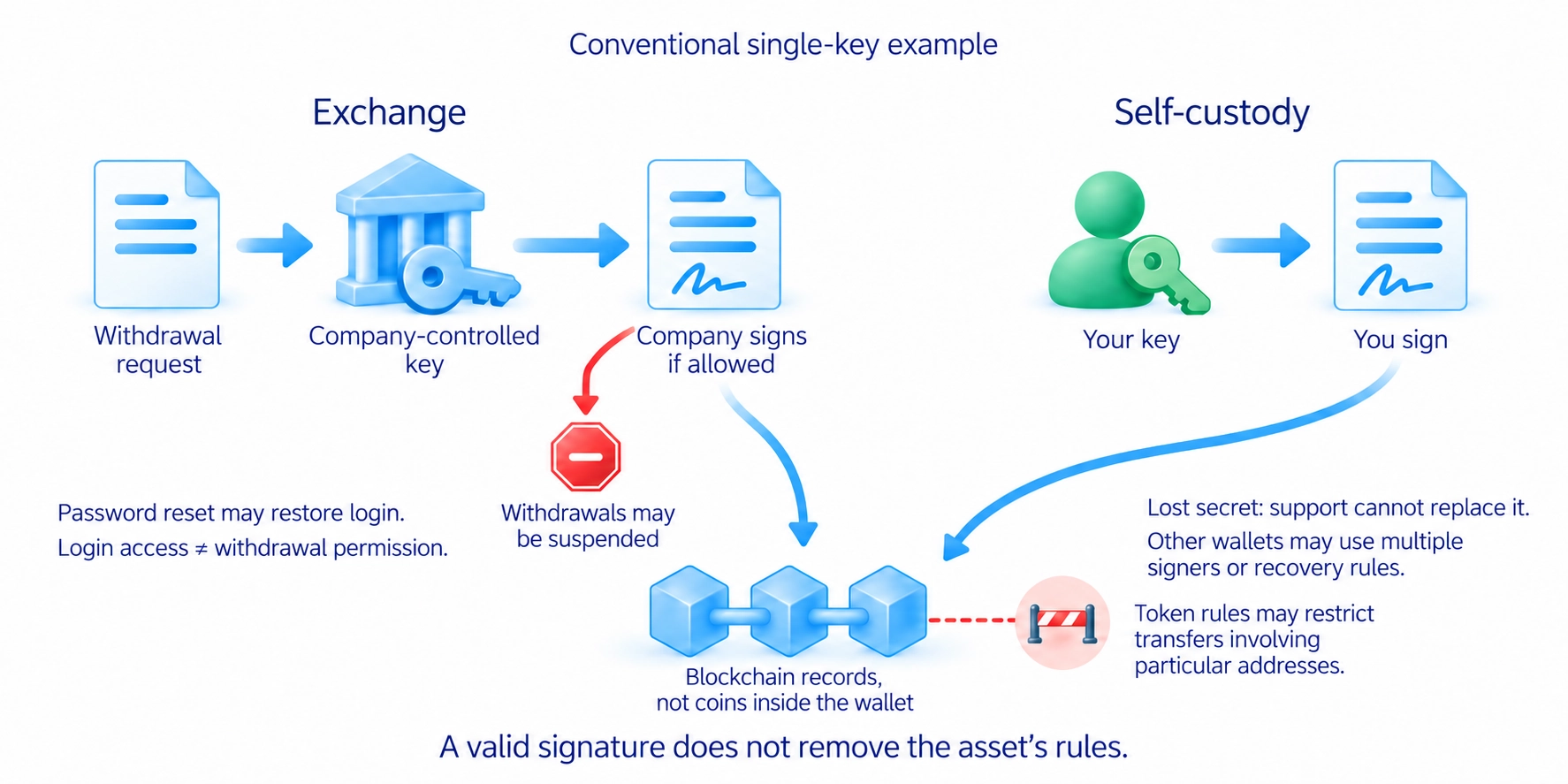
On a centralised exchange, the company normally controls the keys. You sign in to an account and request a withdrawal. Resetting your password may restore account access, but it does not prevent a withdrawal suspension, a security breach or the company's failure. Check who provides the service, how it holds customers' assets and what conditions apply to withdrawals.
With self-custody, you control the keys or the wallet's other authorisation arrangements. In a conventional single-key wallet, customer support cannot replace a lost secret or reverse a confirmed transfer. Some wallets have multiple signers or recovery arrangements. Understand those rules before funding the wallet rather than assuming every wallet works the same way.
Controlling a key does not remove the asset's own restrictions. Some tokens, assets issued on a network, allow the company issuing them to block transfers involving particular addresses. Self-custody describes who manages access; it does not promise that every token can always be transferred regardless of its rules.
Hot, cold and hardware wallets
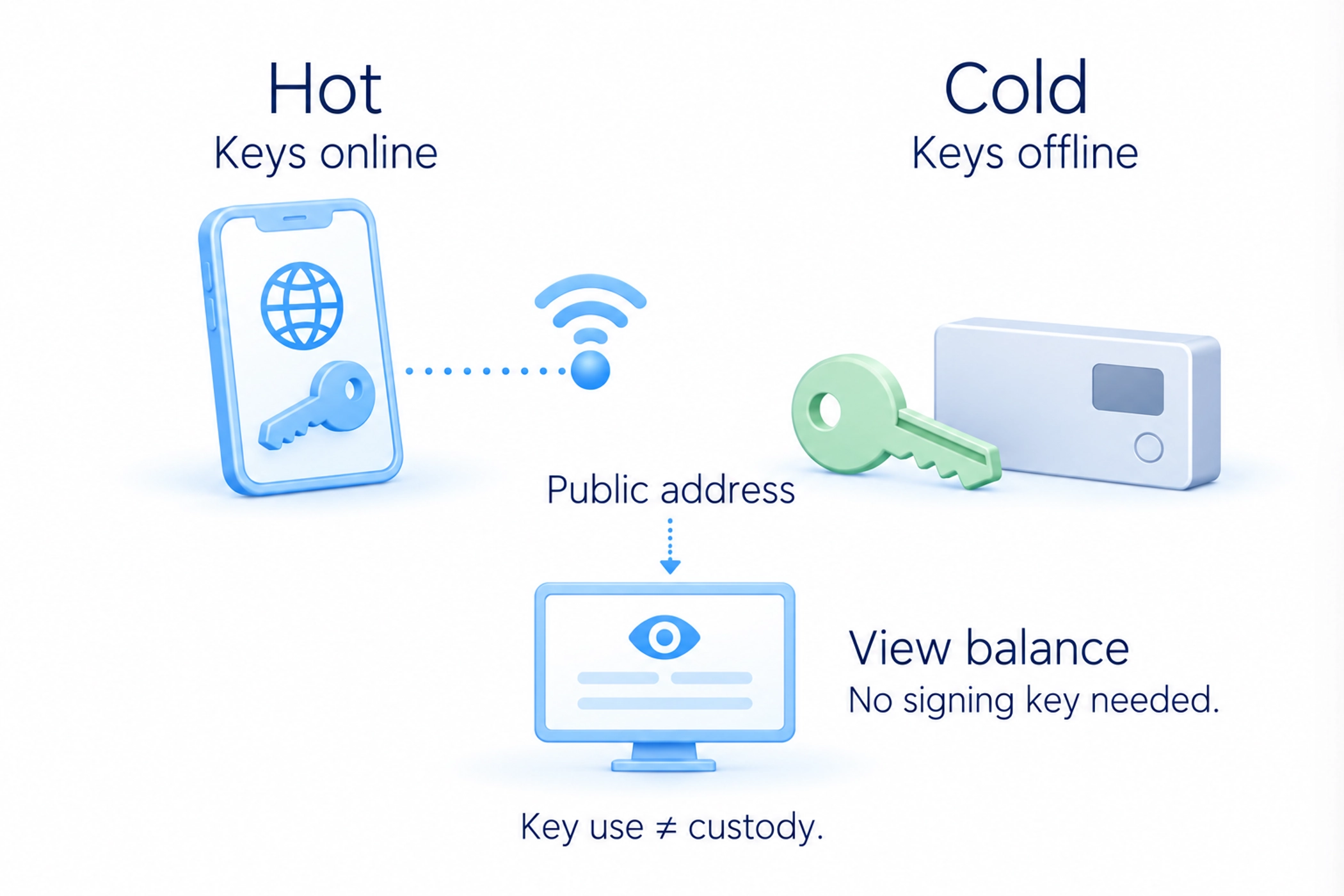
A hot wallet uses keys in an internet-connected environment, such as a phone app or browser extension. This makes transactions convenient, but malicious software, a fake extension or an exposed backup can compromise access. The app's password protects its local data. It does not replace a recovery backup or make disclosed keys secret again.
Hot and cold describe the environment in which keys are used; exchange custody describes who controls them. An exchange normally controls the keys itself, whether it keeps particular holdings in hot or cold storage.
Cold storage keeps secret keys outside a continuously connected environment. You can still check the balance online because viewing an address does not require its signing key. A connected balance-viewing app does not, by itself, mean that the secret key is stored in that app.
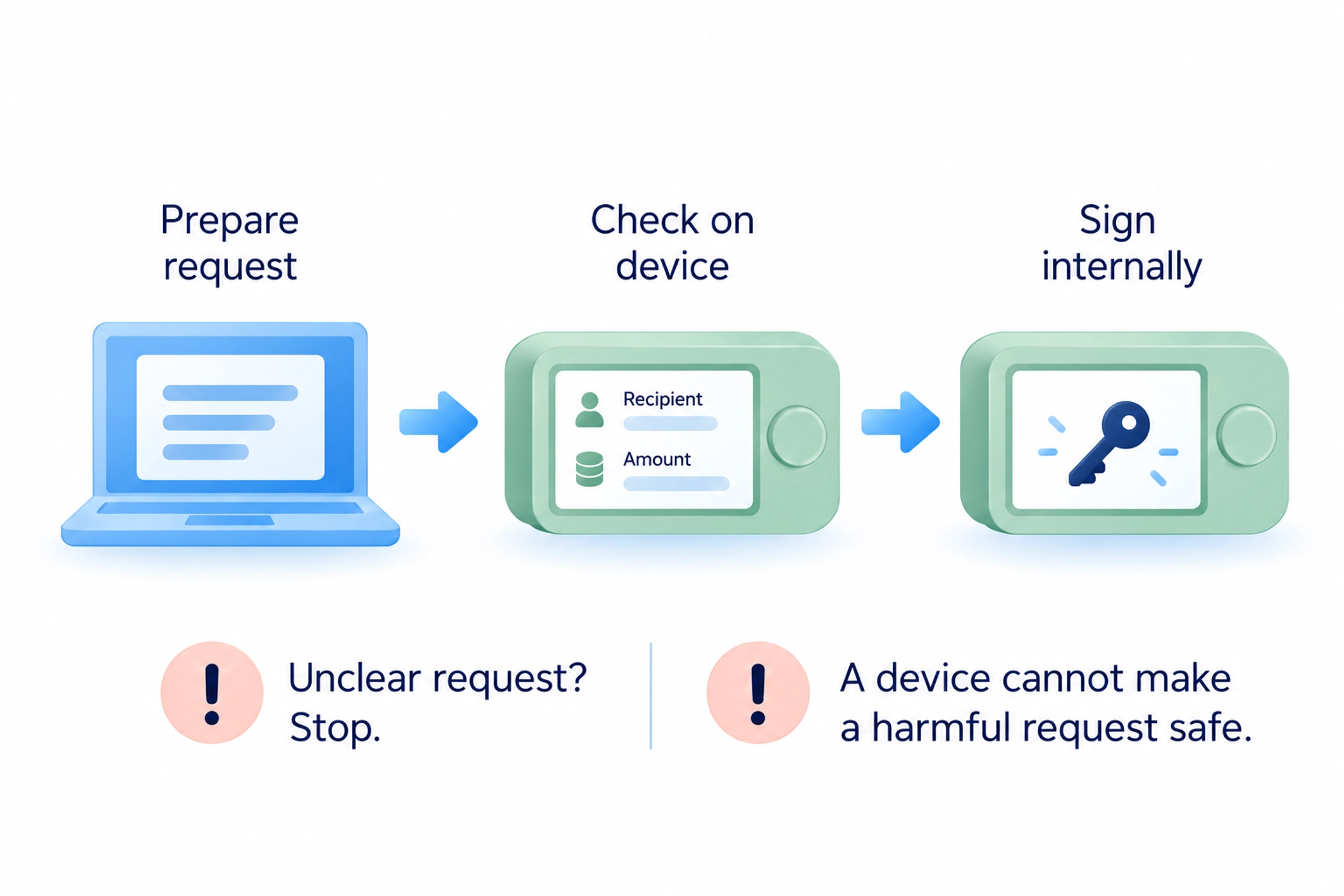
A hardware wallet is a device that holds keys and signs transactions. Typically, software on the computer prepares a request and the device signs it internally. This reduces the need to expose the key to the computer, but does not make every transaction you approve safe.
Check the recipient, amount and available transaction details on the device's trusted screen. Stop if you cannot understand the request. A device can correctly sign a harmful permission that you approved. Buy through a verified supplier, follow the manufacturer's authenticity checks and create your own backup. Do not use recovery words supplied on someone else's completed card.
Keeping a recovery phrase and checking restoration
A seed phrase, also called a recovery phrase, is a set of words used to restore wallets that support this recovery method. The wallet derives information for creating its keys from those words. Twelve and twenty-four words are common, but the format depends on the standard. Let the wallet's proper generation process create the phrase; do not choose words yourself.
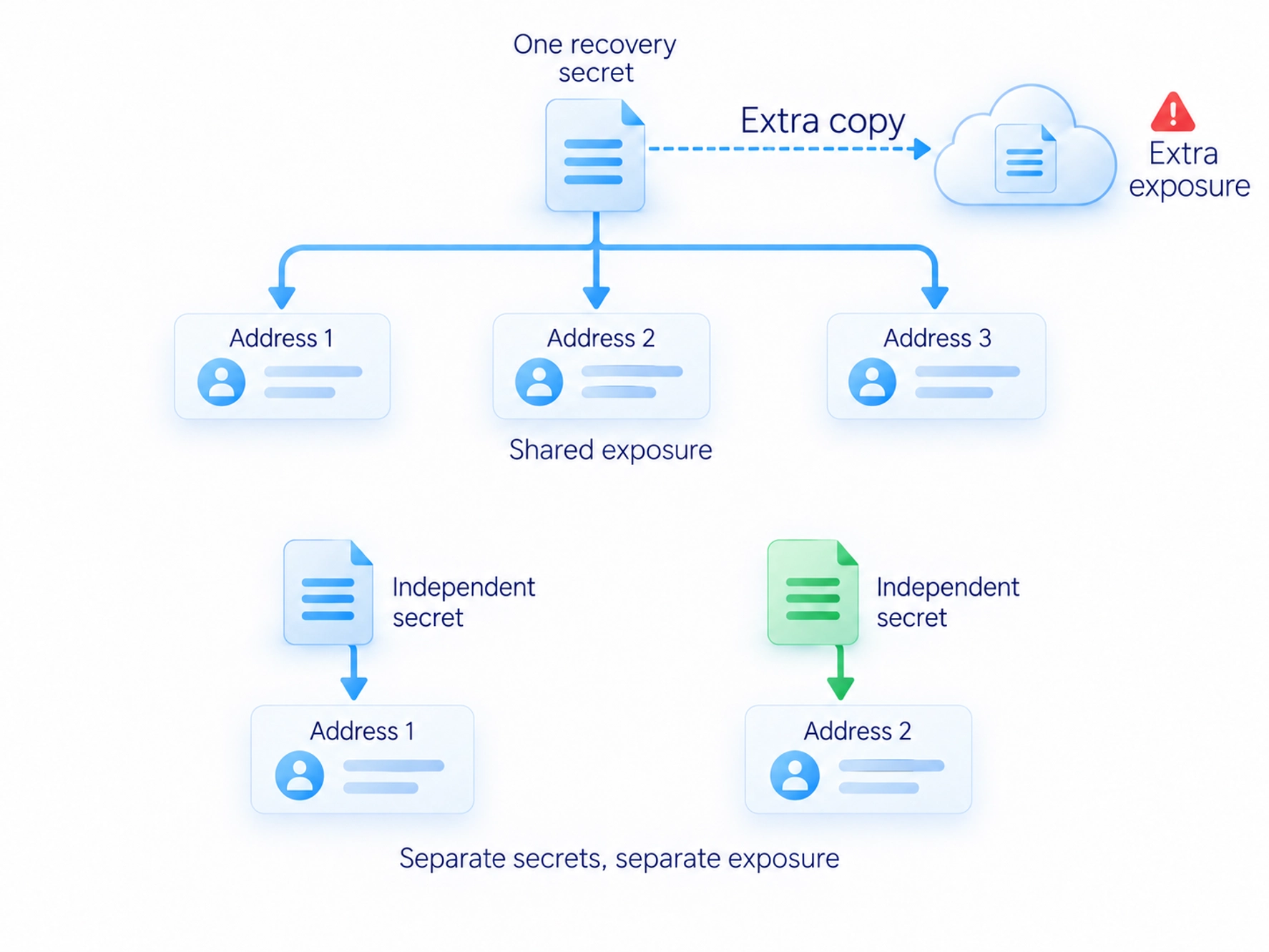
Record the words accurately and in order on a medium that does not sync to the internet. Photos, screenshots, cloud notes and emails create extra digital copies. Paper can burn or become wet; metal can still be lost or stolen. Choose a protected location for those risks, and keep a separate backup apart from the main copy.
One wallet can derive many addresses and accounts from the same recovery secret. Adding an address inside that wallet does not provide independent protection if the original phrase is exposed. Separating this risk requires independently generated secrets, not just different account names in an app.
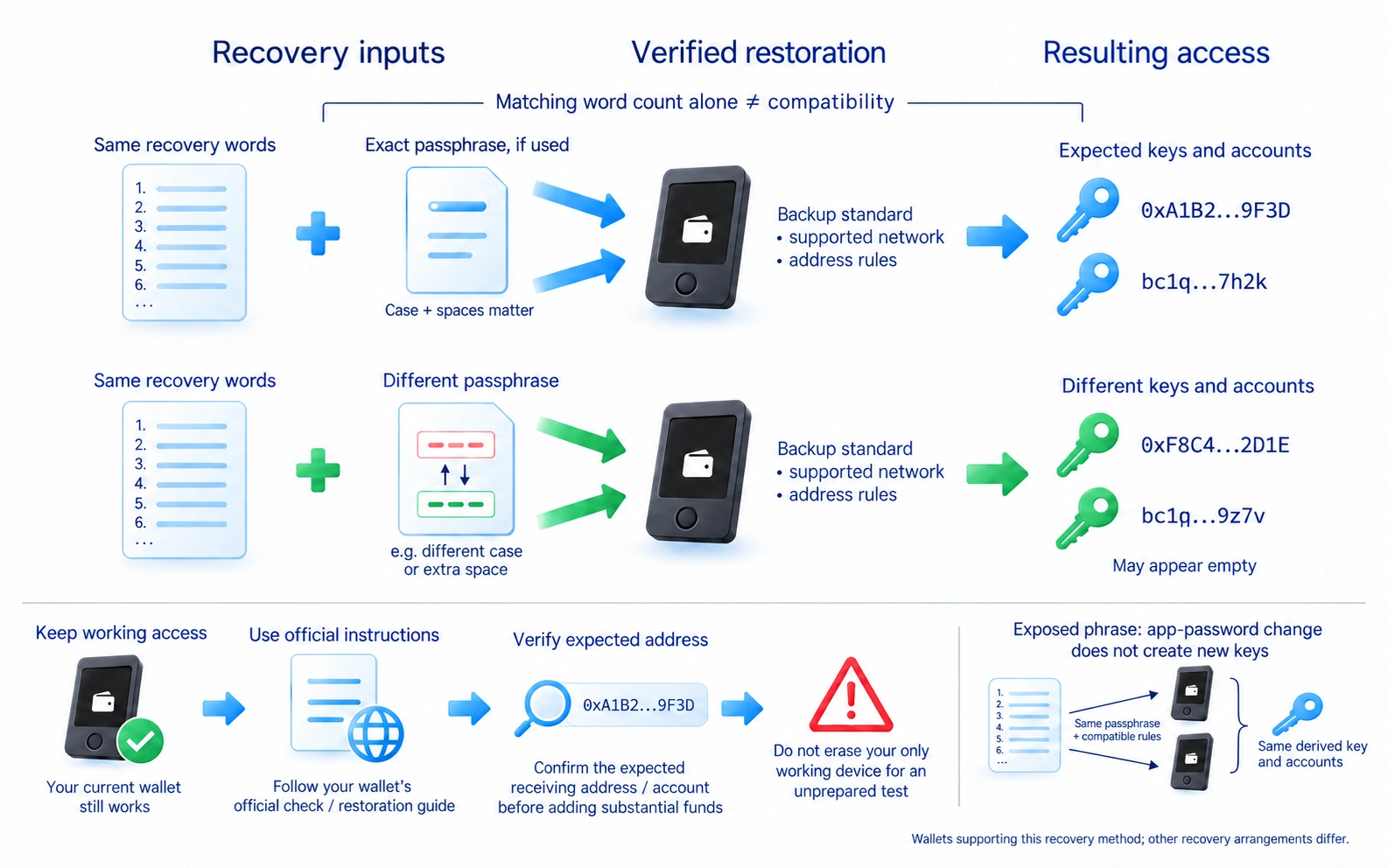
An optional passphrase is an additional secret that changes which keys are restored. It is not necessarily a twenty-fifth word from the recovery word list. Reproduce it exactly, including case and spaces as required by the wallet. A typo can open a different, empty wallet. Without the correct passphrase, the recovery words alone cannot restore access to that passphrase wallet.
Before storing a substantial amount, check the backup using the wallet's official procedure. Some devices can check it without erasing the current wallet. Do not reset your only working device for an unprepared test. Recovery also depends on the backup standard, any passphrase, supported networks and address-generation rules. A matching word count alone does not establish compatibility.
Enter recovery information only during a verified restoration procedure on a trusted device or in the genuine application. Do not send it to support staff, a chat contact or a website offering a security check. If the phrase has been exposed, changing the app password does not change the keys derived from it.
Checking a transfer before you send
First confirm which asset and network the recipient supports. A matching token name or similar-looking address does not establish compatibility. For an exchange deposit, use its current deposit instructions. Some assets require a memo or destination tag, an extra reference identifying your customer account. Omitting it may prevent automatic credit to your exchange balance.
Get the address from a verified source and compare the entire address after pasting it. Do not copy an unfamiliar entry from transaction history. In address poisoning, an attacker places a similar-looking address in that history, hoping you will mistake it for a previous recipient. Matching the beginning and end is insufficient. Malicious software can also replace an address in the clipboard.
Check the fee and whether you hold the asset used to pay it. Sending a token often requires the network's own coin for the transaction fee. A small test transfer can check the route and crediting process, but allow for minimum deposit amounts and service charges. A successful test does not remove the need to check the next transfer's address and network again.
After sending, check the transaction identifier in the selected network's block explorer, a tool showing transaction records. Also confirm that the recipient has received the funds. Network confirmation and credit to an exchange account may occur at different times. A confirmed transfer usually cannot be cancelled from the wallet; an offer to reverse the blockchain is not a reliable recovery method.
Application connections and token permissions
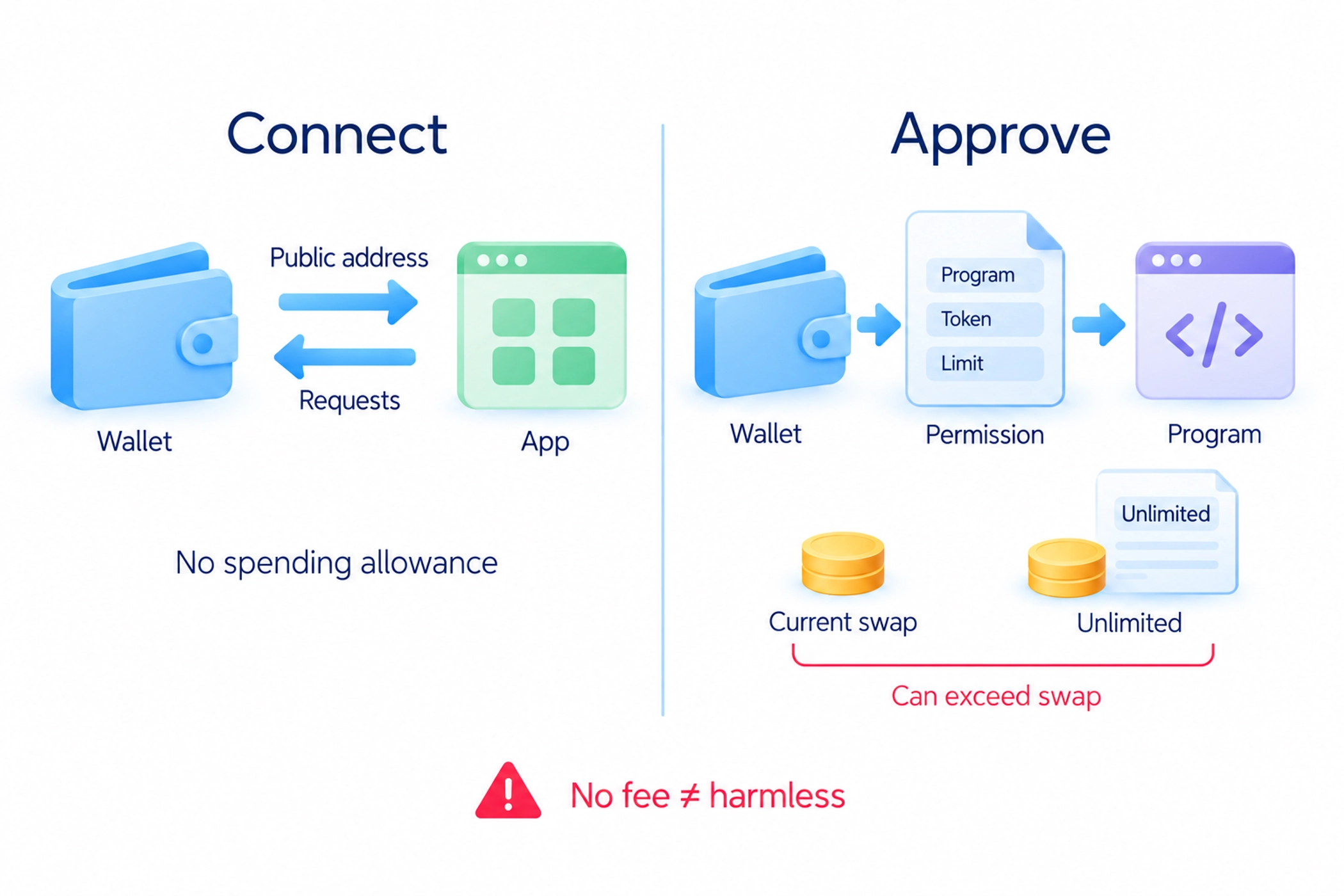
Connecting a wallet to an application is different from allowing it to spend tokens. A connection exposes certain public information and lets the application request actions. A token approval, on networks using these permissions, allows a specified smart contract, a program running on the network, to move particular tokens within the allowance you grant.
Before approving, identify the program, asset and permitted quantity. An unlimited allowance can cover more than the current swap amount. Signing a message can also have consequences: a request with no network fee is not automatically harmless. Do not sign a request you do not understand.
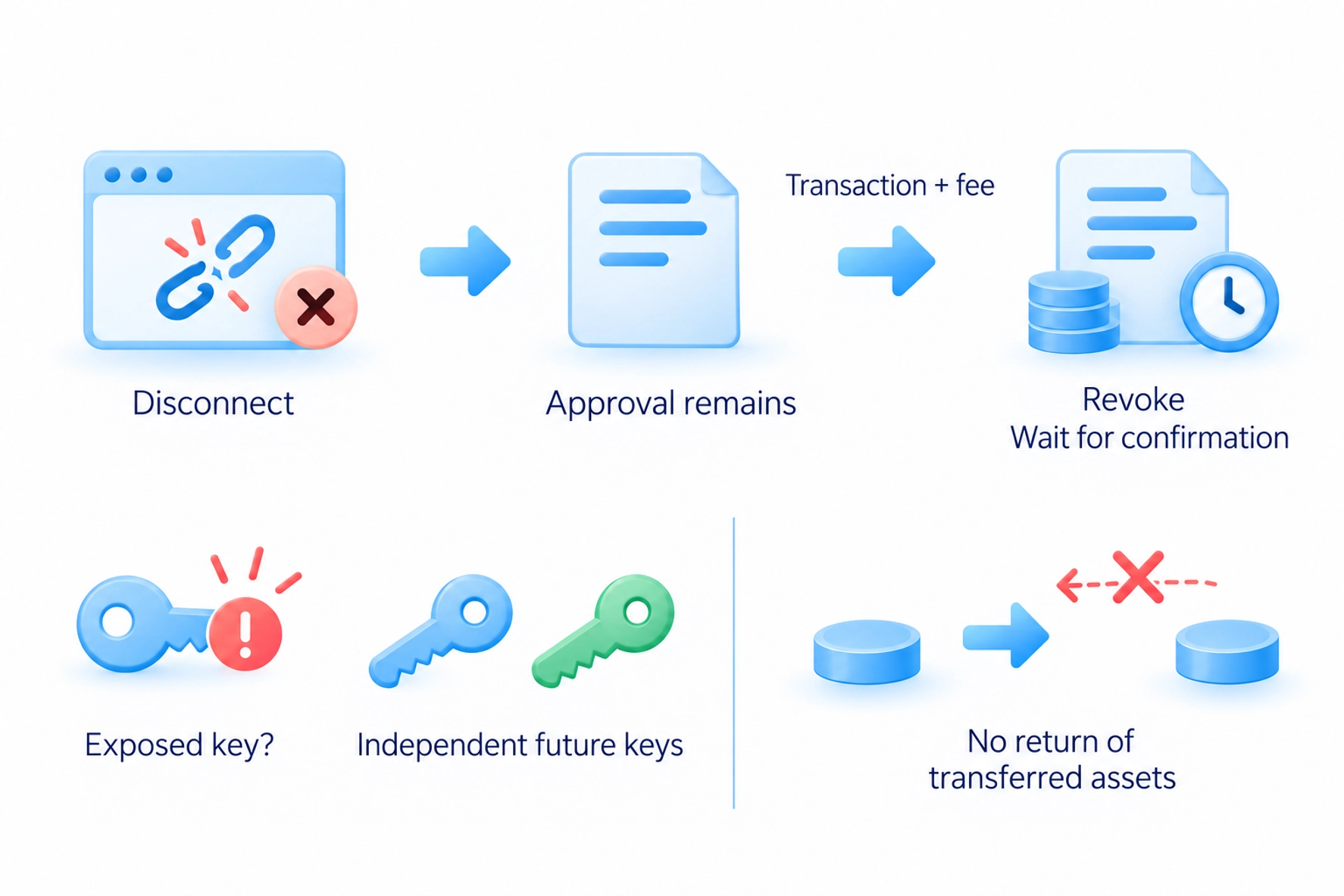
Disconnecting a website does not cancel approvals already recorded on the network. Check them for the correct address and network using the genuine wallet interface or a verified explorer. Revoking an approval normally requires a separate transaction and fee; wait for confirmation. It restricts further use of that permission but does not recover assets already transferred.
If the key or recovery phrase is exposed, revoking approvals is insufficient: another person can sign new transactions. Stop using that wallet for routine deposits. Future storage needs independently generated keys in a trusted environment. If an automated attacker is removing incoming funds, even depositing coins to pay a recovery transaction's fee can be intercepted. That situation needs specialist technical assessment.
Organising storage and backup access
Separate funds by purpose: routine transactions, long-term holdings and experimental application connections. A separate wallet for applications limits the assets subject to its permissions. However, accounts derived from one exposed recovery phrase remain affected by that same disclosure. Separation by account name does not separate the underlying secret.
Protect an exchange account with a unique password and the service's additional authentication options. An authenticator app generates sign-in codes on your device. These codes reduce dependence on the phone's SIM card compared with text messages. A code entered on a fake website can still be relayed to an attacker; it is not complete protection from phishing, an attempt to obtain your access information by impersonating a trusted service. Keep the account's recovery methods and check how to replace a lost phone or other authentication device.
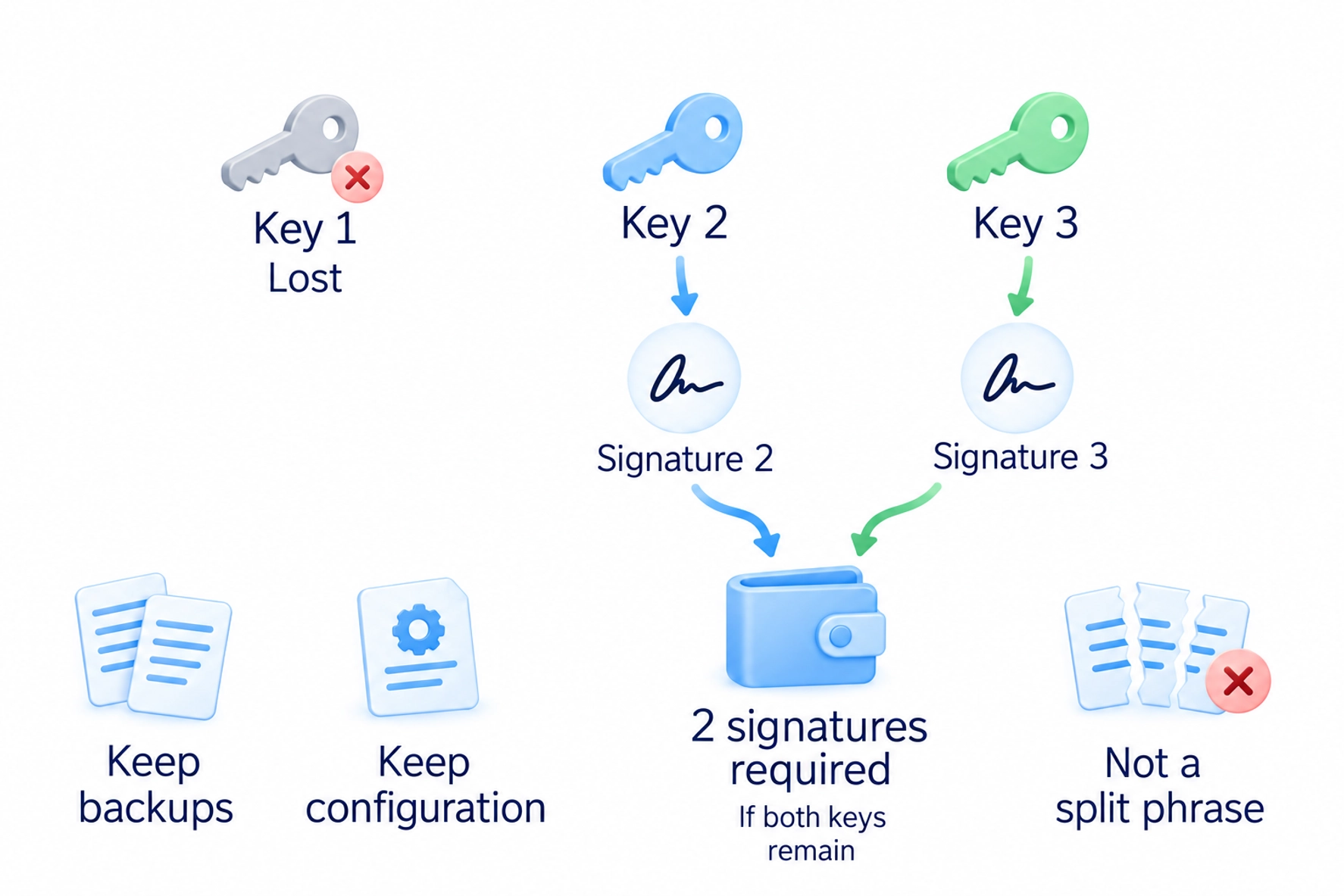
A multisignature wallet uses multiple signing keys and a chosen number of required signatures. A two-of-three arrangement needs two signatures, so losing one key need not block access if the other two remain available. This is different from cutting one recovery phrase into three pieces. Keep the signers' backups and the wallet's configuration information available for recovery.
Before choosing a complex arrangement, check whether you could transfer or restore access without one device, where the required information is kept and who could act if you were unavailable. Do not give every secret to someone offering inheritance assistance. A recovery plan should reduce accidental loss without exposing keys prematurely. Legal inheritance questions require separate advice from the wallet's technical setup.
Use a practical storage check: establish who can sign, test recovery using genuine instructions, and review the permissions on the addresses you use. If a step is unclear, learn it with a small practice amount first. Buying a device does not complete these checks for you.
Frequently asked questions
A hot wallet uses keys in an internet-connected environment. Cold storage separates the secret from that environment, while the balance can still be viewed online. Neither arrangement removes the risk of exposing a backup or approving a harmful transaction.
It can hold keys and sign transactions inside the device. It does not undo a harmful permission you approve or protect a disclosed recovery phrase. Check transaction information on the trusted device screen before confirming.
A cloud copy creates another place from which recovery information can be disclosed. Record the information accurately on a protected medium outside internet synchronisation. Check that backup with the wallet's official procedure.
Often you can, but transaction funds and application permissions have different risks. Independently created wallets can separate those risks. Different addresses derived from one phrase do not protect against disclosure of that phrase.
They reduce dependence on the phone's SIM card and number. However, manually entered codes can still be stolen or relayed through a fake website. Verify the service address and keep the account's supported recovery methods.
It is an attempt to mislead you with a similar-looking address in transaction history. Obtain the recipient address from a verified source and compare the full address after pasting it. Do not rely only on its first and last characters.
It uses multiple signing keys under a chosen rule, such as requiring two signatures out of three. Losing a key need not prevent access if enough other keys remain available. The wallet's configuration and recovery information must also be retained.
About the author
Igor Arapov, practising trader since 2013 and author of the ArapovTrade library. ORCID: 0009-0003-0430-778X.